Trading Event Contracts on Webull Desktop

1. Accessing Event Contracts
To trade event contracts, you need to apply for an Event Account. Go to the account selection tab and tap the Events button.
This account type is only available to U.S. residents and is offered through Omnibus accounts. To check if your account is under Apex Clearing or Omnibus, log in to the app, open the Help Center, then go to Menu -> Account Conversion Status.
2. How Do Event Contracts Work
Step 1: Browse the Contract
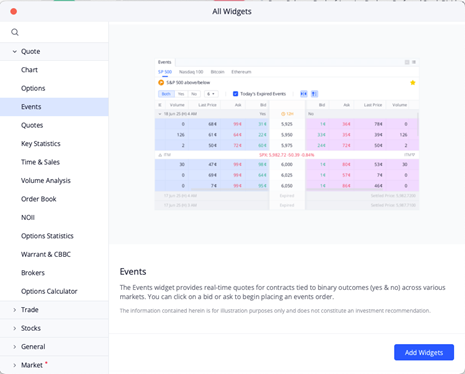
Open the new Events widget under the Markets layout or add it to your custom layout. Double-click on any contract to see details.
Step 2: Buying a Contract
- Minimum cost is $0.02 per contract
- Fees are $0.01 charged by the exchange and $0.01 by the firm, applied to both opening and closing trades
- Choose Yes or No for the event and confirm the order
Example
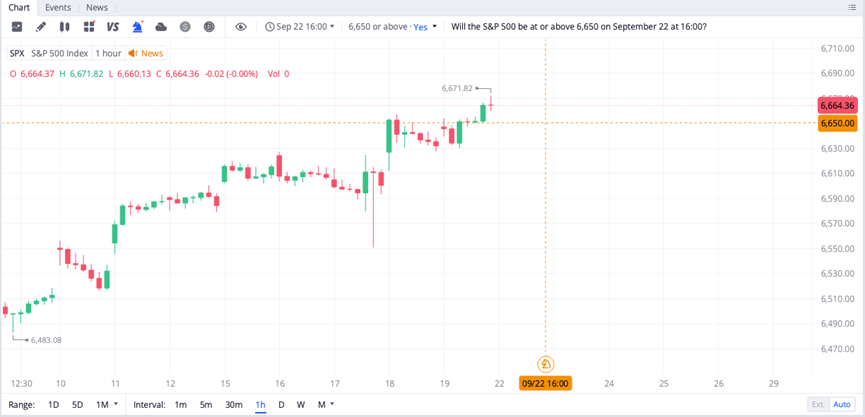
If the contract asks “Will the S&P 500 close at or above 6000 today at 16:00,” buying Yes means you expect it to reach or exceed 6000. Buying No means you expect it to stay below. Both sides reference the same condition.
You can also enable Events mode on charts for 1 minute to 1-hour intervals. For more clarity, it is recommended to use the 30 minute or 1 hour view.
Contract prices reflect probabilities. For example, if “Yes” is priced at $0.60, it implies a 60% chance of the event happening.
Step 3: Holding Until Expiration
You can sell your contract before expiration. For example, buy Yes at $0.60 and sell at $0.80 if the event looks more likely. If you hold to expiration, the outcome decides your result.
Step 4: Settlement & Payout
Payout times are listed on each contract detail page under the Disclaimer and Rules tabs.
- If you bought Yes at $0.60 and the event occurs, you receive $1 per contract
- If the event does not occur, you lose your $0.60 cost

3. Funding and Buying Power
Event buying power is tied to your available withdrawal balance in your linked brokerage account. To check, go to Transfers > Transfer Money > Withdraw. For deposit instructions, visit: https://www.webull.com/help/category/44/177
4. Key Takeaways
- Trading hours vary by contract type. Index events generally run 8 AM to 4 PM EST. Crypto events run 8 AM to 6 PM EST. Hours may expand as new contracts launch.
- Event contracts can only be traded with limit orders. Only Day orders are accepted.
- Event contracts are supported on both mobile and desktop. On desktop, only Index and Crypto events are currently available, with more to come.
